
How to Add EU Withdraw Form on Shopify Using Modrata Order Editing App
If your Shopify store sells to customers in the European Union or the UK, you are legally bound by statutory consumer cancellation directives. Here is why non-compliance risks extending return liabilities by 12 months, and how to set up an automated, self-serve EU withdrawal page in under 2 minutes.
Modrata Engineering Team
Shopify Plus & Operations
What is the EU Right of Withdrawal?
Under the EU Consumer Rights Directive (Directive 2011/83/EU) and the UK Consumer Contracts Regulations, European consumers possess an unconditional legal right to cancel or withdraw from online distance sales within a minimum 14-calendar-day cooling-off window without incurring penalties or providing any justification.
Crucially, the law requires merchants to provide an easily accessible model withdrawal form or electronic withdrawal mechanism before and after the purchase takes place.
If an online merchant fails to provide clear statutory information and an accessible model withdrawal mechanism, the customer's withdrawal period is automatically extended by 12 months (making it 1 year and 14 days). Buyers can legally return heavily used items for a 100% full refund up to a year later.
This regulation applies not only to EU-based merchants, but to any international brand (US, Canada, Australia, UK) that sells, advertises, or ships products to consumers residing inside the 27 EU member states.
Why Traditional Shopify Withdrawal Workflows Break
Shopify does not provide a native self-service withdrawal portal out of the box. As a result, merchants typically resort to one of two flawed workarounds:
- Static PDF Forms: Forcing customers to download a PDF, print it out, manually sign it, and scan it back via email creates friction, sparks angry reviews, and invites high payment disputes.
- Customer Support Ticket Chaos: Customers email support with “Cancel my order” or “I want to withdraw”. By the time a support rep responds 3 hours later, the 3PL warehouse has already printed shipping labels and dispatched the parcel.
Modrata Order Edit solves this completely by embedding a compliant, self-serve Withdraw Order Form directly into your Shopify theme in under 2 minutes.
Complete Setup Guide: 4 Easy Steps to EU Compliance
Follow the 4-step guide below with step-by-step video walkthroughs to activate your EU withdrawal portal on Shopify:
Create a Dedicated Page Template
Add a dedicated page template in your theme so the withdraw form has a clean layout.
- Go to Online Store → Themes in your Shopify Admin.
- Click Customize on your live theme.
- Open the top-center dropdown, choose Pages, then click Create template.
- Name it (e.g.
withdraw-form), keep it based on Default page, and save.
Create the Withdrawal Page
Add the storefront page that will use the new template.
- Go to Online Store → Pages in your Shopify Admin.
- Click Add page in the top right.
- Set the title to Withdraw Order (leave the content area empty).
- Under Theme template in the right-hand panel, pick the
withdraw-formtemplate you just created. - Click Save.
Add the Form App Block in Theme Editor
Embed Modrata's interactive self-serve form block onto the page.
- Click Customize on your live theme.
- Use the top-center dropdown to open the Withdraw Order page created in Step 2.
- In the sidebar, click Add block → Apps and pick Withdraw Order Form.
- Click Save in the top-right corner.
Add Link to Your Menu (1-Click Setup)
Place the link in your footer or customer account menu so shoppers can easily locate it.
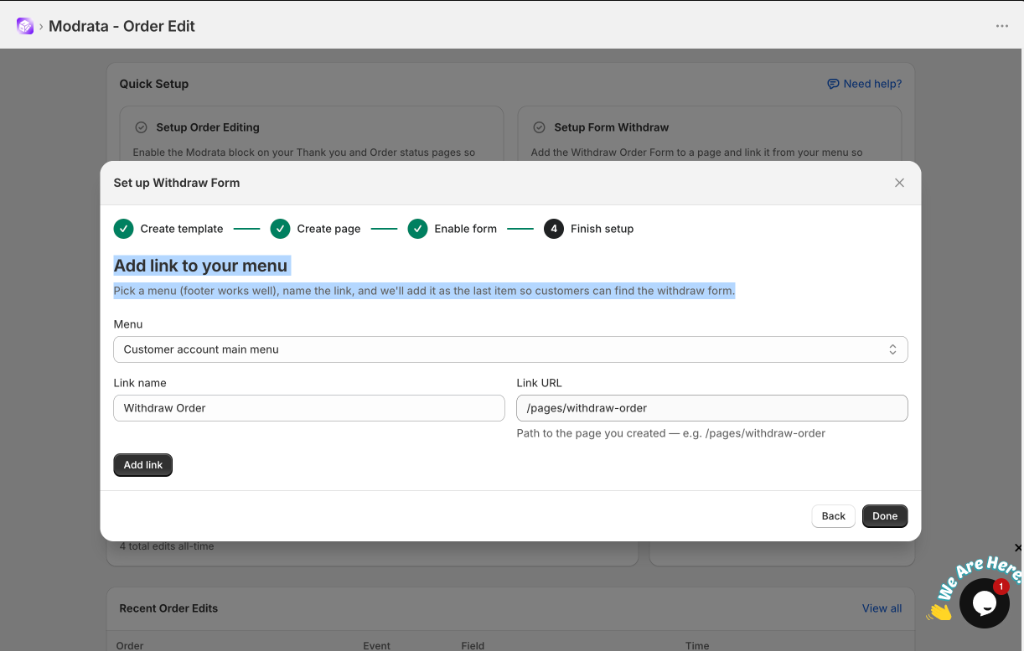
EU compliance mandates that the cancellation link must be clearly accessible to consumers. Modrata includes a built-in menu installer inside the app dashboard:
- In your Modrata App dashboard, navigate to Quick Setup → Setup Form Withdraw.
- Under Menu, pick your menu (e.g. Footer menu or Customer account main menu).
- Set Link name to
Withdraw Order(orRight of Withdrawal/Widerrufsrechtfor German stores). - Confirm the Link URL points to
/pages/withdraw-order. - Click Add link, then click Done.
Operational Best Practices for High-Volume Stores
1. Automated 3PL Fulfillment Holds
When a customer submits a withdrawal request via Modrata, the order is automatically tagged (e.g. withdrawal_pending) and a fulfillment hold is triggered in Shopify. This prevents 3PL integrations (ShipBob, ShipStation, ShipHero) from printing labels or packing cancelled items.
2. Multi-Language Store Support
If you use Shopify Markets or translation apps, provide localized menu names: Widerrufsbelehrung & Formular (Germany/Austria), Droit de rétractation (France), Diritto di recesso (Italy), and Derecho de desistimiento (Spain).
3. Order Confirmation Email Placement
Add a direct link to yourstore.com/pages/withdraw-order in your Shopify order confirmation email notifications to maintain full audit compliance.
Why Modrata is the Preferred Solution
| Feature | Traditional Method | Modrata Order Edit |
|---|---|---|
| Setup Time | Hours / Developer required | Under 2 minutes |
| Customer Experience | Static PDF / Print & scan | 100% digital self-service |
| 3PL Hold Sync | Manual support email check | Automated hold tag |
| EU Legal Compliance | High risk of non-compliance | Fully compliant (Directive 2011/83/EU) |
Frequently Asked Questions
Do US stores need to comply with the EU Right of Withdrawal?
Yes. Any online merchant that sells, ships, or markets to consumers located in the European Union or UK is legally subject to these consumer directives.
Does Modrata require any code editing or theme liquid file changes?
No. Modrata utilizes Shopify Online Store 2.0 Theme App Blocks and App Embeds. Everything is installed cleanly without touching liquid code.
Can customers withdraw from specific items or entire orders?
Modrata allows shoppers to submit statutory cancellation for full orders or individual line items according to your store policy configurations.
Automate EU Order Withdrawal Compliance Today
Protect your Shopify store against 12-month return liabilities and deliver effortless self-serve cancellations in under 2 minutes.